

Function to generate default avatar
Purpose
This function generates a URL for a default avatar image based on a user's name or email, or returns a provided image link. It's used in Glide applications to ensure all users have an avatar displayed.
Important Notes
- This is a JavaScript function intended for use in the JavaScript column in Glide, not the code component.
- If the
imageLink(p3) value does not exist, the function returns a UI Avatars link. - If
imageLink(p3) exists, the function simply returns the existing image link. - If the full name (p1) does not exist, the function uses the email (p2) as a fallback for generating the avatar.
Function Signature
function generateAvatar(fullName, email, imageLink)Parameters
fullName(string, optional): The full name of the useremail(string, optional): The email address of the userimageLink(string, optional): A direct link to an avatar image
Returns
- (string): A URL to an avatar image, either the provided
imageLinkor a generated avatar URL
Description
This function creates a default avatar using the UI Avatars service when no image link is provided. It prioritizes using the fullName parameter, falling back to email if fullName is not available. The function encodes the name for URL safety and sets specific styling parameters for the generated avatar.
The generated avatar has the following characteristics:
- Background color: #291755 (dark blue)
- Text color: #ffffff (white)
- Size: 256x256 pixels
- Font size: 33% of the image size
- Rounded corners
- Bold text
If an imageLink is provided, the function returns it directly without generating a new avatar.
Full Function Code
function generateAvatar(fullName, email, imageLink) { // Directly return the image link if it's available if (imageLink) { return imageLink; } // Base URL for UI Avatars const baseURL = "https://ui-avatars.com/api/"; // Attempt to split the full name into first and last names, fall back to the full name if not possible let name = fullName || email; name = encodeURIComponent(name); // Construct the query parameters const params = [ `background=291755`, `color=ffffff`, `size=256`, `font-size=0.33`, `rounded=true`, `bold=true`, `name=${name}` ].join('&'); // Return the complete URL for UI Avatars if no image link is provided return `${baseURL}?${params}`;}return generateAvatar(p1,p2,p3) `name=${name}` ].join('&'); // Return the complete URL for UI Avatars if no image link is provided return `${baseURL}?${params}`;}return generateAvatar(p1,p2,p3)GitHub-Deployed Version
For a more developer-friendly solution with additional options, you can use the GitHub-deployed function:
URL: https://thinhdinhlca.github.io/default-glide-avatar/
Instructions:
-
Copy and paste the link into an Experimental Code column in Glide.
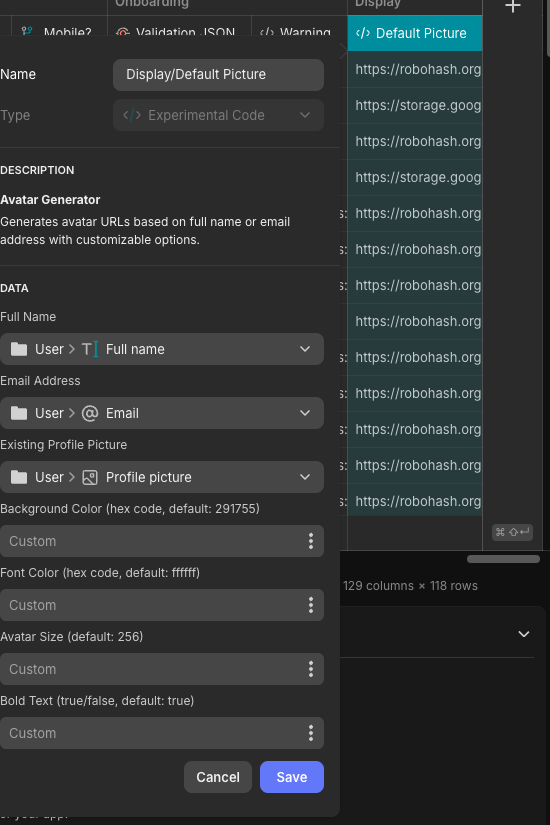
Example Usage
// Generate avatar with full namelet avatar1 = generateAvatar("John Doe", "john@example.com", null); // Generate avatar with emaillet avatar2 = generateAvatar(null, "jane@example.com", null); // Return existing image linklet avatar3 = generateAvatar("Alice Smith", "alice@example.com", "https://example.com/alice-photo.jpg");Related Functions/APIs
- UI Avatars API (https://ui-avatars.com/)