Building Refinement Assets (Process Flow)
Building the Process Flow
Purpose
To define a standardized, repeatable method for Product Engineers (PEs) to create a Process Flow diagram that accurately represents the operational process the app or platform is intended to support. This asset lays the foundation for the rest of the refinement deliverables and is often the first to be validated with the client.
Objectives of the Process Flow
The Process Flow must answer four core questions:
WHAT happens? – Define each step or action in the operational process.
WHO performs it? – Identify which user role is responsible for each action.
WHEN does it happen? – Reflect the order and logic of each action or stage.
HOW does it happen? – Determine whether the action is manual, system-triggered, or conditional.
Step-by-Step Procedure
🔹 1. Preparation (Before 1st Refinement Call)
Upon being notified of a new project (ideally 1–2 days in advance), the PE should:
Review the Sales-prepared Scope or Project Overview.
Extract key information related to business processes and actors.
Draft a high-level version of the Process Flow based on initial understanding.
💡 The goal is not to complete the Process Flow, but to define its main stages and outline the core participants (User Roles) involved. This helps drive efficiency in the upcoming calls.
🔹 2. Build the High-Level Draft
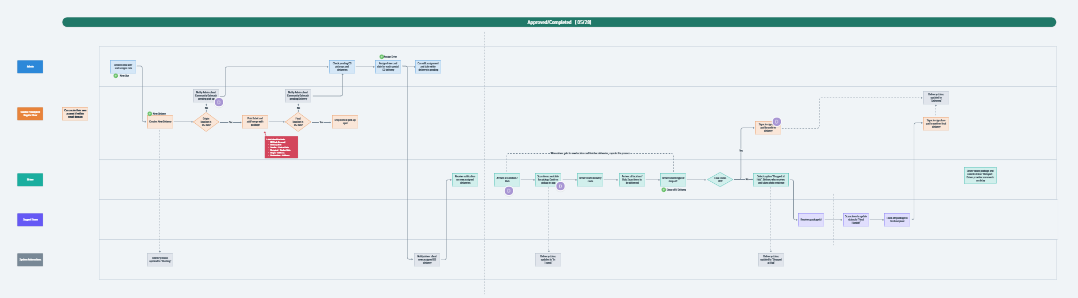
Create a lane-based (swimlane) diagram to distinguish responsibilities by role.
Focus on mapping:
Main stages (e.g., submission, review, approval, delivery).
Key user actions and automations (e.g., triggers, notifications).
At this point, we don't need to add exhaustive detail—this version will evolve through client feedback.
🔹 3. Identify User Forms
For any action involving data entry or submission, explicitly indicate that a Form is involved.
The structure and fields of each Form will be defined in the Datasheet, but its existence and placement must be visualized in the Process Flow.
Example: “Submit New Request (Form)” should clearly appear under the appropriate user lane.
🔹 4. Use the Diagram as a Guide in Refinement Calls
Share and iterate on the Process Flow in calls 1–3, or as needed.
Use client feedback to:
Confirm assumptions,
Fill in process gaps,
Validate the accuracy of user roles and responsibilities,
Clarify automation logic or approval flows.
Continue refining until alignment with the client is achieved.
🔁 The timeline for completing the Process Flow is flexible—it should be validated as early as possible, but quality and clarity are the priority.
🔹 5. Maintain Consistency Across Assets
Ensure that the Process Flow aligns and integrates with the rest of the refinement assets:
Use it as the base input for building User Flows.
Reference it when structuring the Conceptual Data Model / ER Model (to identify core entities and relationships).
Define identified forms, statuses and notifications in the Datasheet.
Notes
Always use a lane-based diagram for visual clarity; One lane for each User Role and one additional lane for "System Automations".
Ensure each action includes a responsible actor.
If an action leads to a status change, make sure it aligns with the Item Flow (if applicable).
If the app integrates with external sources, note any steps that involve external data ingestion.
Any required or additional comment or clarification should be included in the Process Flow as a comment (see example in final deliverable image).
Deliverable
A finalized, client-approved Process Flow diagram in a FigJam document and referenced in Plutio.
📌 Optional Extension: Item Flow Diagram
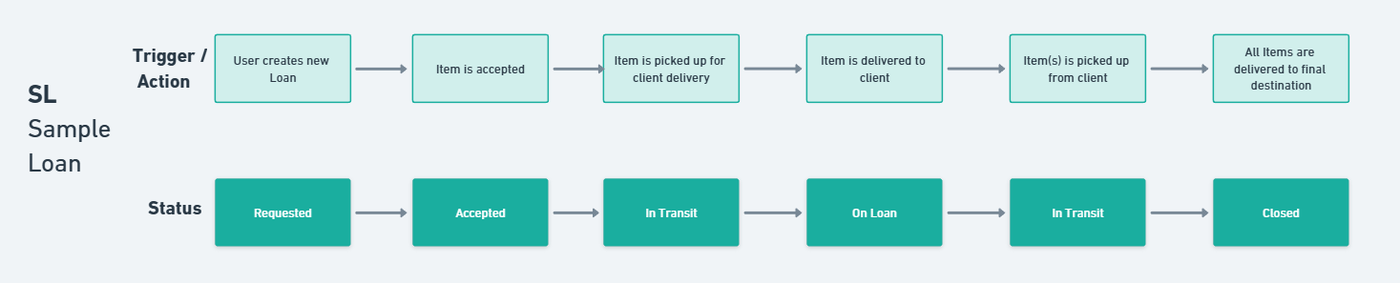
In projects where a core entity (such as a task, request, order, or loan) moves through a series of defined statuses, the BA should include an Item Flow Diagram as a complementary asset to the Process Flow.
This diagram visually represents:
The status lifecycle of a specific entity within the app.
The user actions or system triggers that cause a status change.
Structure:
A 2-lane horizontal diagram, where:
The top lane displays user actions or system events (e.g., “User submits request”, “Admin approves loan”).
The bottom lane shows the corresponding status transitions (e.g., Pending → Approved → In Transit → Completed).
The BA is responsible for:
Identifying the full set of possible statuses an item can have.
Defining what actions, approvals, or triggers move an item between those statuses.
Ensuring the diagram is aligned with the Process Flow and Permissions Matrix.
📌 This asset is especially useful for workflows involving approvals, delivery, logistics, or service fulfillment. It should be created only when an entity’s status lifecycle is central to the app’s logic.
The final Item Flow should be built in FigJam and saved in the same board as the Process Flow.
Deliverable