

FlutterFlow | Project Structure Guidelines
Layers
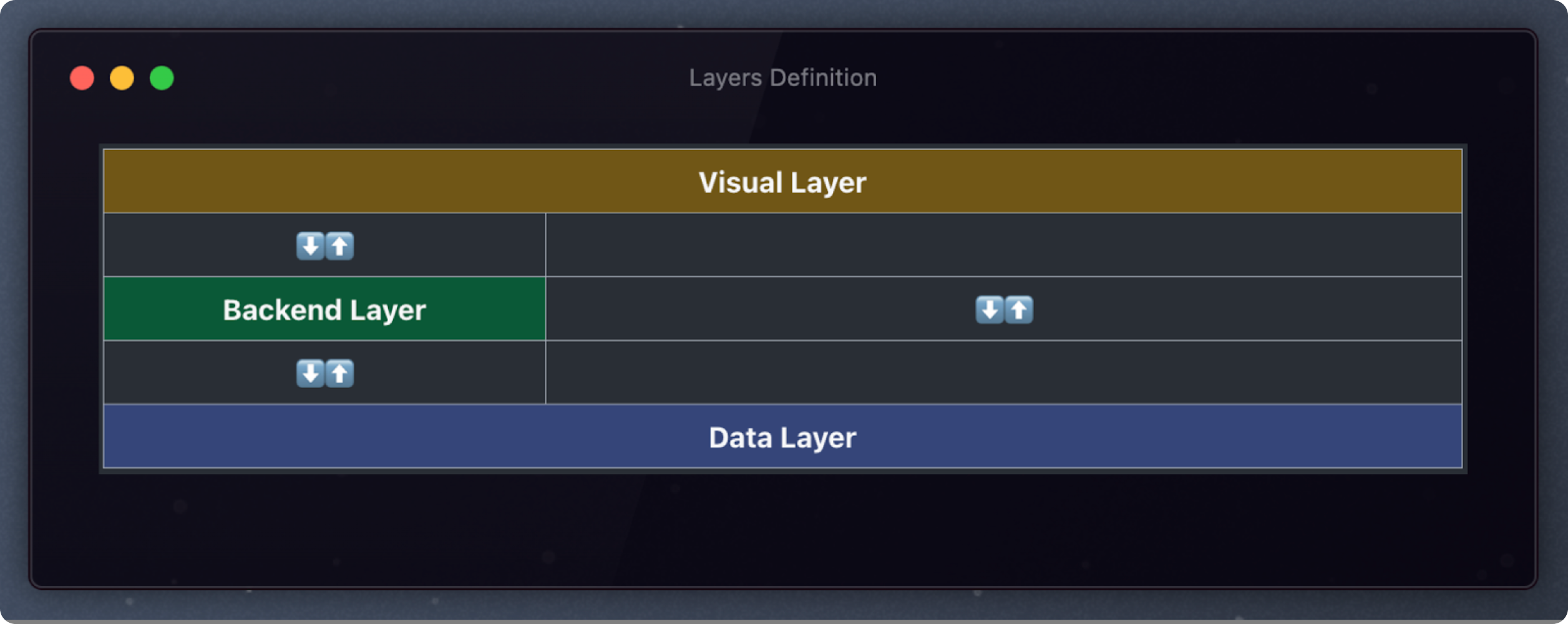
Our applications typically consist of three layers:
- Frontend: User-facing part of the software that users directly interact with. This is where Flutterflow is located
- Backend OR Backendless: Backend is a server-side infrastructure that handles business logic; whereas Backendless solutions like Firebase and Supabase are cloud services that handle typical backend functionality without requiring server management.
- Database: Storage solutions that handle data storage, while maintaining relationships and integrity, in SQL (like PostgreSQL) or NoSQL (like Firebase's Firestore), each optimized for different data structures and scaling requirements.
Project Setup
- App Information: Define the app and package name (e.g., com.company.appname), and bundle identifier following company standards.
- Theme Settings: Establish a comprehensive theme before development begins, including:
- Primary, accent, and custom colors (don’t use hard-coded colors, i.e., don't create a component with background #262626, instead, create a custom color that stores that information and use it on the component background)
- Typography system (font families, sizes, weights)
- Standard widgets: buttons, text fields, and any other relevant widgets
- Language: Define the language (even though the app is only English)
- App Details: Set the pages to require authentication by default
- Default constants:
- defaultPageMaxWidth: 600px
- defaultPadding: 16px
- defaultBorderRadius: 10px
- defaultDropdownMaxWidth: 300px
- Action Blocks:
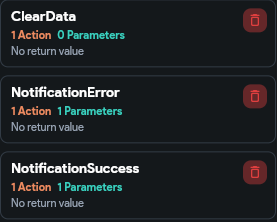
- Clear Data: The default action block that must erase all app states and query caches needs to be triggered when: logging out the user, logging in the user.
- NotificationSuccess: The default notification success snackbar, with only 1 action: show a styled snackbar with 1 parameter "text" that will be changed according to the triggered flow
- NotificationError: The default notification error snackbar, with only 1 action: show a styled snackbar with 1 parameter "text" that will be changed according to the triggered flow
-
[TO BE WORKED] Environment Configuration:
- Set up development, staging, and production environments
- Configure environment-specific variables (API endpoints, feature flags)
- Establish connection details for backend services
- [TO BE WORKED] Dependencies Management:
-
- Document required packages with specific versions
- Include purpose and usage notes for each dependency
- Group dependencies by functionality (UI, networking, state management)
Naming Conventions
- The name should indicate its function and avoid abbreviations, so use clear and descriptive names.
Project Naming: PascalCase. E.g., use "MyAPP" instead of "my app" or "My app".
Route Naming: kebab-case. E.g., use "flutterflow-guidelines" instead of "FlutterflowGuidelines" or "flutterflowGuidelines".
Folder Naming: camelCase. E.g., use "flutterflowGuidelines" instead of "FlutterflowGuidelines" or "flutterflow-guidelines".
Page Naming: PascalCase, with suffix "Page". E.g., "UserPage" instead of "user-page" or "user".
Component Page: PascalCase, followed by a word denoting their type. E.g., "UserCard" instead of "user-card" or "userCard".
Custom Code: camelCase. E.g.: “calculateTotalPriceIncludingTax,” “getUserByIdFromActiveList,” “updateOrderQuantity.”
Custom Code Parameters, Page Parameters, App State, Page State, Component State, Constant, Enum, Data Type: Should use camelCase.
Folder Structure
 |
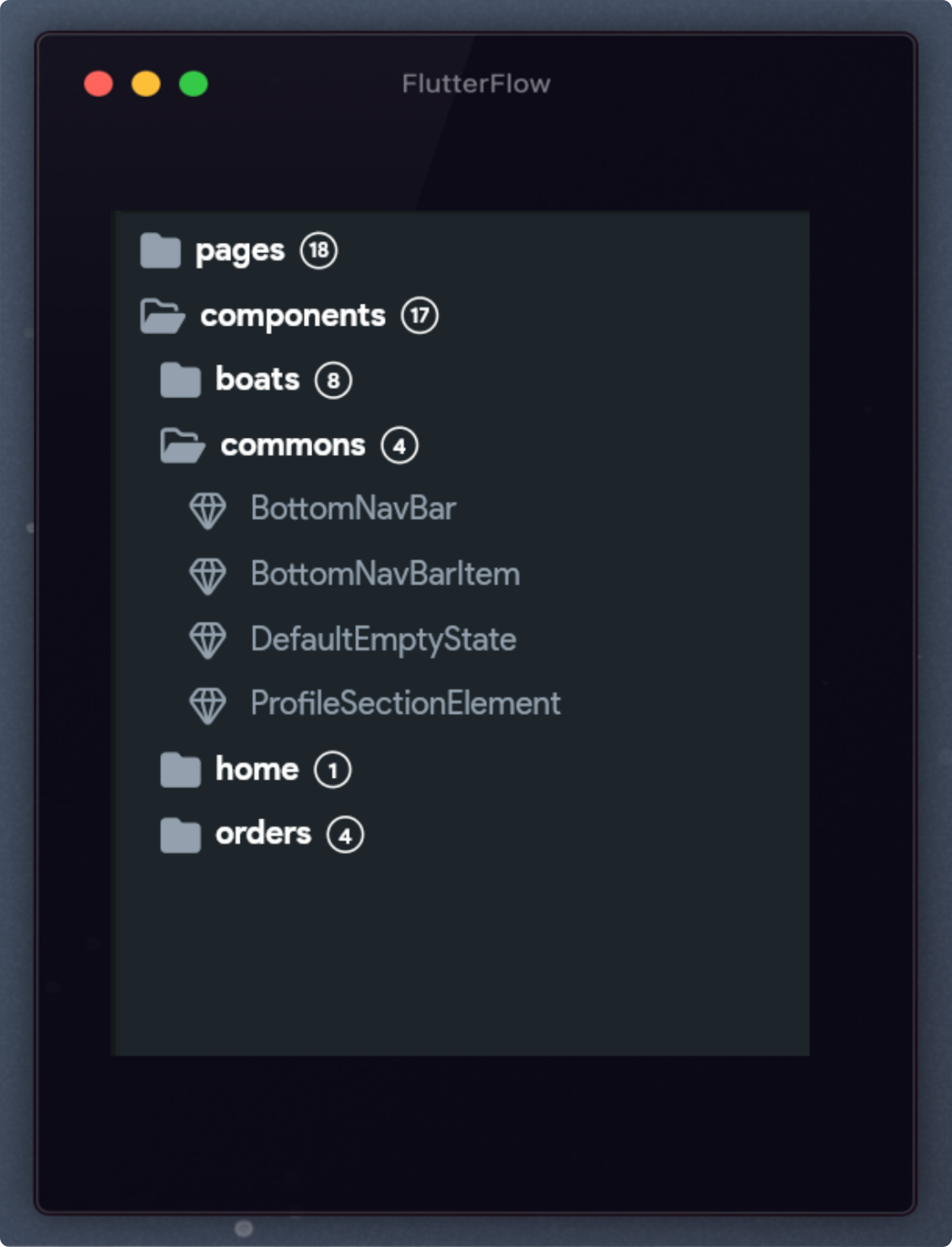 |
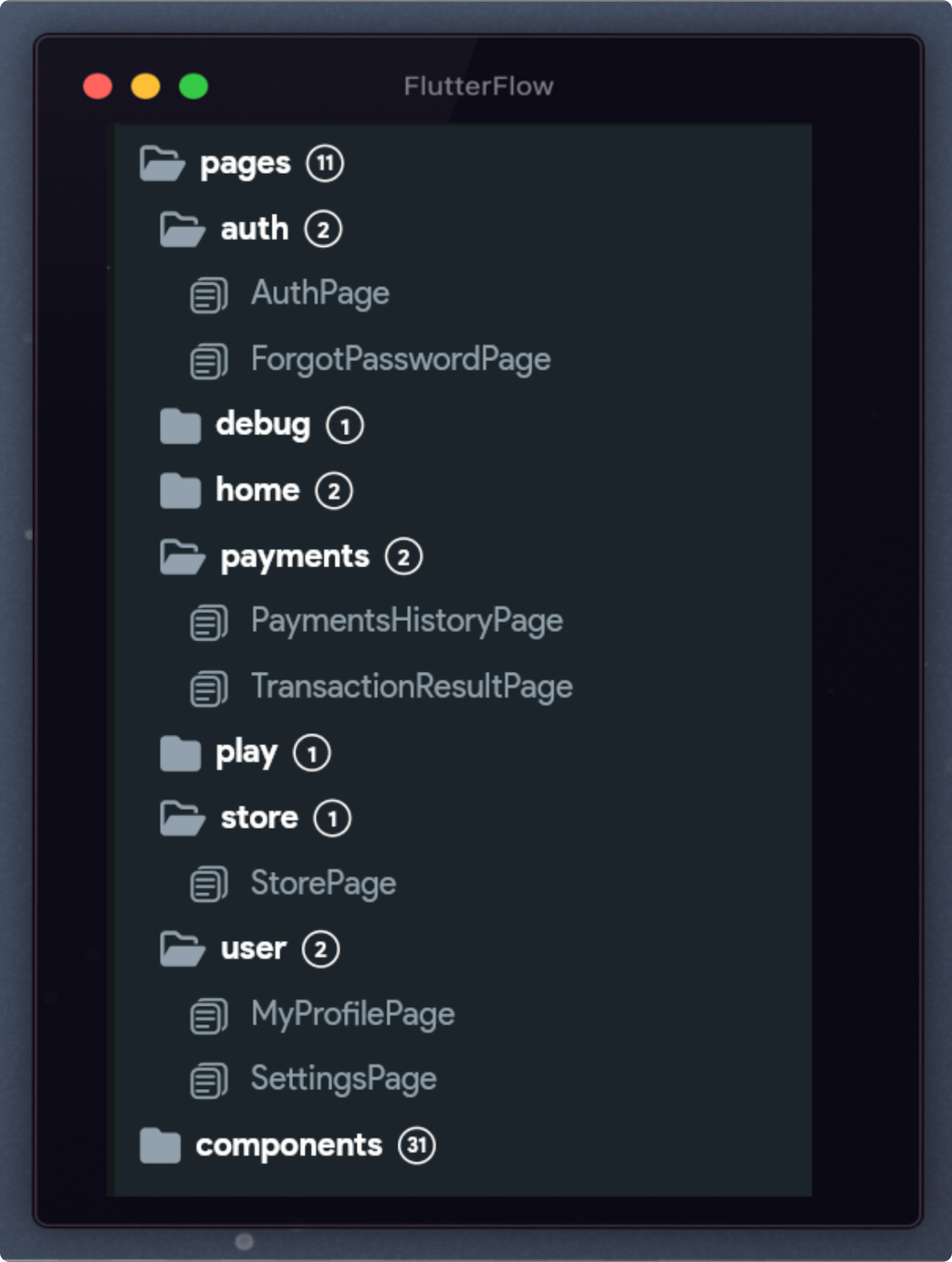
All pages and components must follow these guidelines:
- If a page/component is part of a group or flow, include it in a folder related to that group.
- For pages displaying lists, use plural names. For example, use “UsersPage” instead of “UserListPage.”
- Divide visually complex pages into components to improve readability.
- Components used extensively across different pages can be placed in the “global” folder.
- Assign unique responsibilities to components to avoid multi-purpose components. For instance, create separate cards for user information and job information.
- Limit components to five parameters to enhance readability and maintainability. Consider passing a single object encapsulating all relevant data.
Custom Code
- Keep FlutterFlow code files concise and manageable. Break down complex logic into smaller, well-defined functions, actions, or components.
Actions Call Result
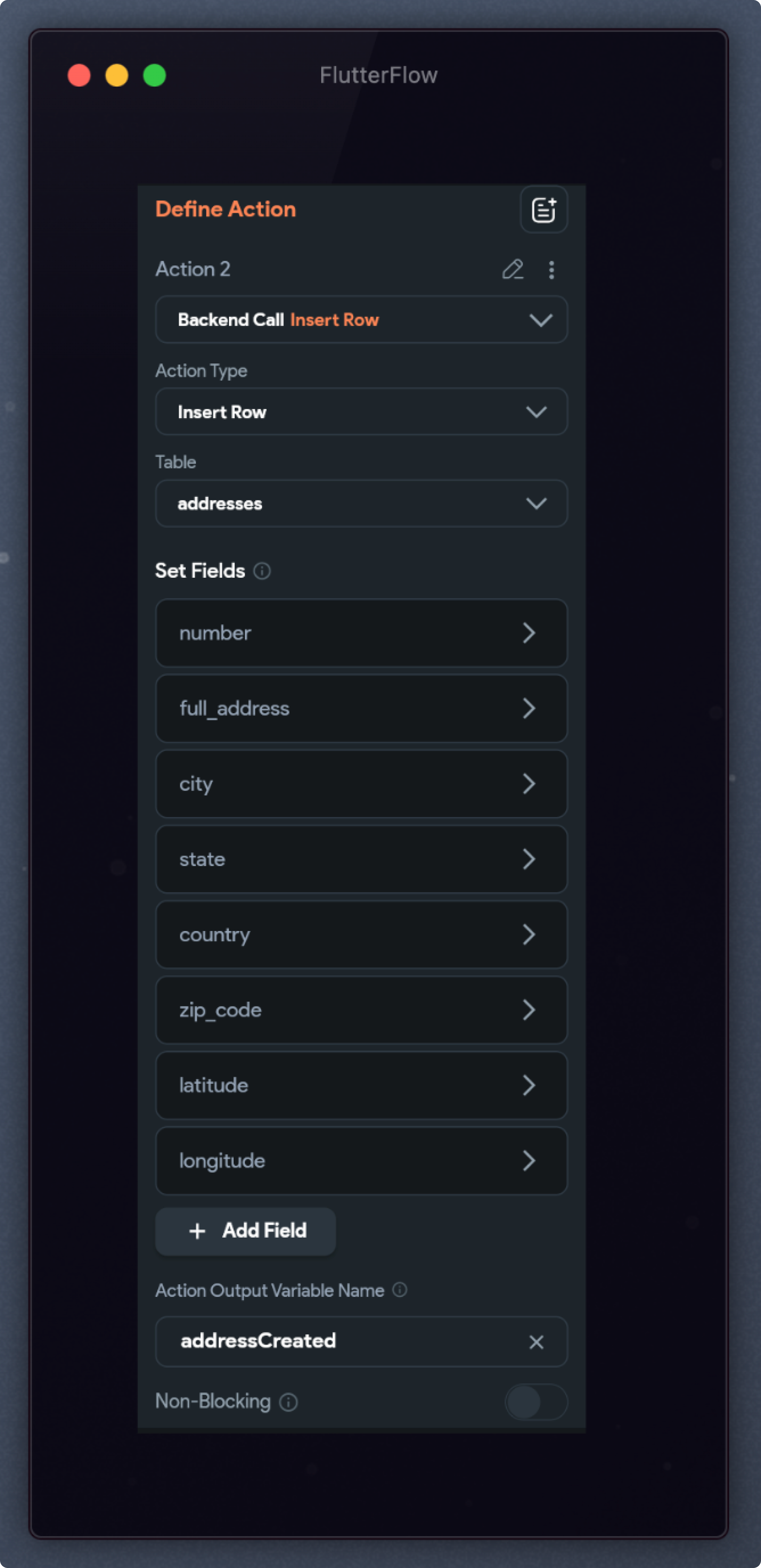
When an action call returns a value to be used elsewhere, store that value in a variable:
- Specify the nature of the result at the end of the name. Examples: “addressCreated” or “userUpdated.”
Action Blocks
When an action or a group of actions needs to be triggered more than once, consider creating action blocks that allow us to maintain the app better.
- Below are the de default action blocks that are required when setting up the project: ClearData, NotificationError, and NotificationSuccess
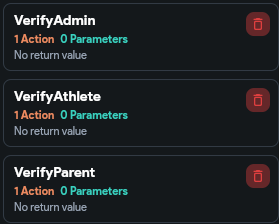
- When a page is allowed for a specific type of user, it's necessary to validate the type of the logged user when the page is rendered, creating an action block for each type of user, which guarantees better maintenance.
 |
 |
App State vs Page State vs Component State vs Constant vs Enum
E.g.: When you are inside a flow and you need to pass information back-and-forth between one page to another, or one page to a component, you DON'T need an App State, you can just use Page/Component Parameters to send information to the next page/component and Callback Actions to retrieve information from the page/component
App State: App states are accessible throughout the entire application, persisting across screens and sessions. It's ideal for user data, authentication status, or any information needed across multiple pages.
- Make sure to enable the "Persist" toggle for data that should persist in the cache, e.g., when the user closes the app and opens it again, it doesn't make sense to request all of their data again, that could just be pulled from the persisted "loggedUser" app state.
Page State: State scoped to a specific page that persists only while that page is active. It's used for data that's relevant only to a particular screen, like form inputs, page-specific UI toggles, or temporary data that doesn't need to be accessed elsewhere in the app.
Component State: Local state confined to a specific widget or component, managing its internal functionality without affecting other parts of the app. It's perfect for toggle states, animation controllers, or any data that should be isolated to that component's behavior.
Constants: Fixed values that never change during app execution, such as configuration settings or predefined values. They're typically defined once and referenced wherever needed, ensuring consistency throughout the application.
Enums: Predefined sets of named values used to represent a fixed collection of related options or states, like user roles (admin, user, guest) or application modes (light, dark, system). Enums make code more readable by replacing "magic strings" or numbers with descriptive names that have a clear meaning.
The primary goals of having standards and rules in place during application development include:
- Ensuring consistency: Standards ensure the application is developed consistently, meeting user and stakeholder expectations and providing a better user experience.
- Streamlining the development process: Standards reduce development time and effort by avoiding rework, errors, and inefficiencies.
- Improving collaboration: Standardization ensures that everyone works towards the same goals, improving team collaboration and reducing conflicts and miscommunication.
- Enhancing application quality: Standards ensure maintainable, scalable, and extensible code, improving application quality and security.
- Reducing risks and costs: Adhering to standards helps identify and mitigate potential issues early, reducing risks and costs associated with errors, security vulnerabilities, and project failures.
This guide serves as a starting point for defining your development standards tailored to your specific needs or those of your company.